Background Image Parallax
How to Make a Background Image Parallax using Framer Motion and React
NarakCODE • October 19, 2024
Scroll
Parallax
Framer Motion
Nextjs
Creating the Project
Let's start the project by creating a Next.js application. We can do that by running npx create-next-app@latest client inside of a terminal.
- We will use Framer Motion for the animation, so we can run
npm i framer-motion. - We will use the Lenis Scroll for the smooth scrolling, so we can run
npm i lenis.
Basic Background Parallax
The basics of creating a background image parallax is as follow:
- Create a container with an overflow hidden
- Add an image inside of that container taking the full width and height of it
- Translate the image on scroll
1// components/Intro.jsx
2import React from 'react';
3import Image from 'next/image';
4import Background from '../../public/images/2.jpg';
5import { useScroll, useTransform, motion } from 'framer-motion';
6import { useRef } from 'react';
7
8export default function Intro() {
9  const container = useRef();
10  const { scrollYProgress } = useScroll({
11    target: container,
12    offset: ['start start', 'end start'],
13  });
14
15  const y = useTransform(scrollYProgress, [0, 1], ['0vh', '150vh']);
16
17  return (
18    <div className='h-screen overflow-hidden'>
19      <motion.div style={{ y }} className='relative h-full'>
20        <Image
21          src={Background}
22          fill
23          alt='image'
24          style={{ objectFit: 'cover' }}
25        />
26      </motion.div>
27    </div>
28  );
29}
Couple notes about the code above:
- The progress of the scroll is tracked using the
useScroll Hook - Since the component is the first inside the page, we use an offset of
['start start'] - The progress of the scroll (a value between 0 and 1) is transformed into a value between 0vh and 150vh and used as a
translateYvalue
Then I'm adding that component inside the page.js:
1// page.js
2'use client';
3import { useEffect } from 'react';
4import Lenis from 'lenis';
5import Intro from '@/components/Intro';
6import Description from '@/components/Description';
7
8export default function Home() {
9  useEffect(() => {
10    const lenis = new Lenis();
11
12    function raf(time) {
13      lenis.raf(time);
14      requestAnimationFrame(raf);
15    }
16
17    requestAnimationFrame(raf);
18  }, []);
19
20  return (
21    <main>
22      <Intro />
23      <Description />
24      <div className='h-screen'></div>
25    </main>
26  );
27}1// components/Description.jsx
2import React from 'react';
3
4export default function Description() {
5 return (
6 <div className='flex justify-center my-40'>
7 <p className='text-[7.5vw] uppercase text-center max-w-[50vw] leading-none'>
8 The quick brown fox jumps over the lazy dog
9 </p>
10 </div>
11 );
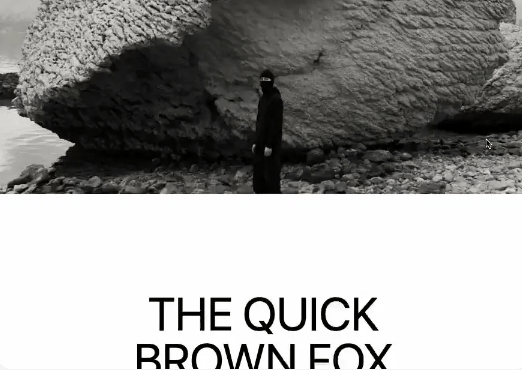
12}We should have something like this:
Advanced Background Parallax
The other way of making a background parallax is the same way but instead the container will be in position fixed.
1// components/Section.jsx
2import Image from 'next/image';
3import Background from '../../public/images/1.jpg';
4import Text from './components/Text';
5import { useScroll, useTransform, motion } from 'framer-motion';
6import { useRef } from 'react';
7
8export default function Section() {
9  const container = useRef();
10  const { scrollYProgress } = useScroll({
11    target: container,
12    offset: ['start end', 'end start'],
13  });
14  const y = useTransform(scrollYProgress, [0, 1], ['-10vh', '10vh']);
15
16  return (
17    <div
18      ref={container}
19      className='relative flex items-center justify-center h-screen overflow-hidden'
20      style={{ clipPath: 'polygon(0% 0, 100% 0%, 100% 100%, 0 100%)' }}
21    >
22      <Text />
23      <div className='fixed top-[-10vh] left-0 h-[120vh] w-full'>
24        <motion.div style={{ y }} className='relative w-full h-full'>
25          <Image
26            src={Background}
27            fill
28            alt='image'
29            style={{ objectFit: 'cover' }}
30          />
31        </motion.div>
32      </div>
33    </div>
34  );
35}- Couple notes about the above code:
- The image container is in position fixed, so we need to add a
clip-pathon the parent to crop that fixed div. - The same principles apply from the previous implementation, we translate the image based on the position of the scroll.
- The amount translated here (-10vh and 10vh) should be accounted in the height of the fixed container (120vh).
- The image container is in position fixed, so we need to add a
We should have something like this:
Wrapping up
That's it for this animation!
A super clean animation that in my opinion should be in almost every single websites, it really adds a nice dimensionality and brins it to another level of quality. Hope you learned something!